IoT
IoT 2022 期末作业
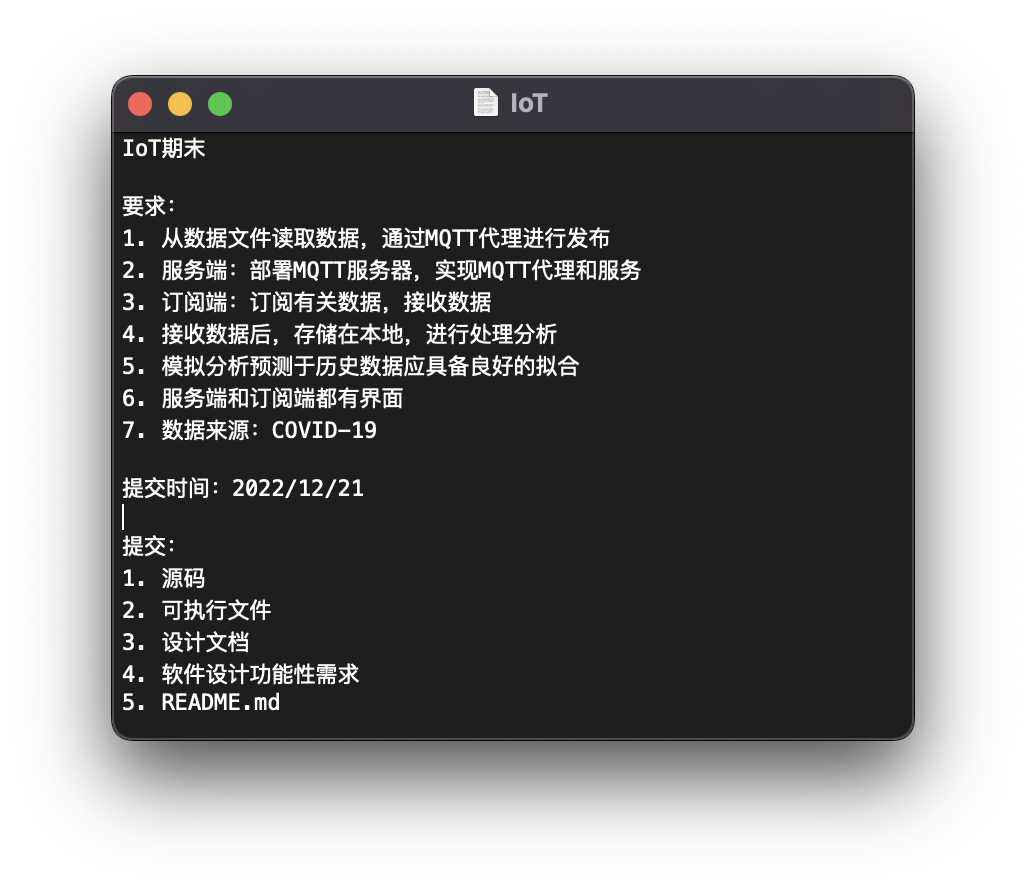
题目要求
使用说明
设计思路
文档
TODO LIST
- 2022.11.22: 项目初始化
- 完成发布和订阅端的基本通信功能
- 实现发布端的数据采集功能
- 实现订阅端的数据展示功能
- 实现数据的持久化存储
- 实现机器学习模型的训练和预测
- 实现数据的可视化展示
初步实现
2022.11.22
- 创建一个新的项目
pnpm init
- 添加mqtt依赖
pnpm add mqtt
- 创建index.js
touch index.js
- 添加start脚本
vim package.json
{
  "name": "iot",
  "version": "1.0.0",
  "description": "",
  "main": "index.js",
  "scripts": {
    "start": "node index.js"
  },
  "keywords": [],
  "author": "",
  "license": "ISC",
  "dependencies": {
    "mqtt": "^4.2.8"
  }
}
- index.js的内容
const mqtt = require('mqtt');

const host = 'broker.emqx.io';
const port = '1883';
const clientId = `mqtt_${Math.random().toString(16).slice(3)}`;

const connectUrl = `mqtt://${host}:${port}`;
const client = mqtt.connect(connectUrl, {
  clientId,
  clean: true,
  connectTimeout: 4000,
  username: 'emqx',
  password: 'public',
  reconnectPeriod: 1000,
});

const topic = '/nodejs/mqtt';
client.on('connect', () => {
  console.log('Connected');
  client.subscribe([topic], () => {
    console.log(`Subscribe to topic '${topic}'`);
  });
  client.publish(topic, 'nodejs mqtt test', {qos: 0, retain: false}, (error) => {
    if (error) {
      console.error(error);
    }
  });
});
client.on('message', (topic, payload) => {
  console.log('Received Message:', topic, payload.toString());
});
- 运行
pnpm start
- 在MQTTX中订阅
/nodejs/mqtt主题,可以看到消息
- IOS端使用MQTT Tool订阅
/nodejs/mqtt主题,可以看到消息